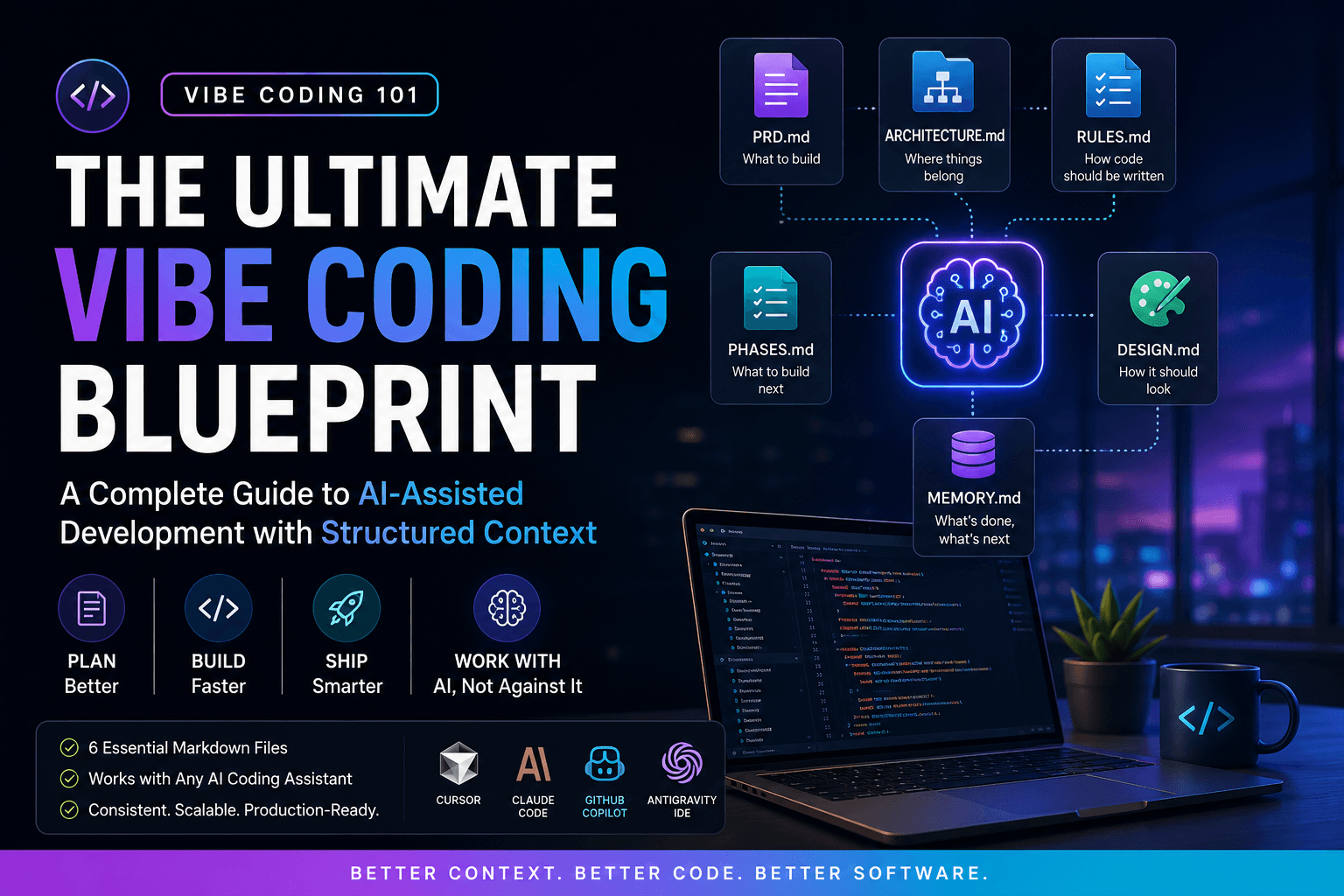
What is Vibe Coding?
Vibe Coding is the practice of building software by collaborating with AI coding assistants instead of writing every line manually. Rather than relying on increasingly complex prompts, you provide AI with structured project documentation so it understands your product, architecture, coding standards, and development progress. With the right context, AI becomes a far more reliable engineering partner that produces cleaner, more consistent code throughout your project.
The quality of AI-generated code depends more on project context than prompt length.
The Problem with AI Coding
If you've used Cursor, Claude Code, GitHub Copilot, or any modern AI coding assistant, you've probably experienced the same frustration. The AI starts strong, but after several conversations it begins forgetting earlier decisions, generating inconsistent code, introducing duplicate components, or creating features you never requested.
The problem isn't that AI is bad at coding-it's that AI doesn't permanently remember your project's architecture, coding conventions, folder structure, or roadmap unless you provide that information again.
- Repeatedly explaining your project
- Inconsistent folder structures
- Changing coding styles
- Forgotten implementation details
- Hallucinated features
- Wasted prompt tokens
The Solution: Structured Project Documentation
Instead of treating every AI conversation like a fresh start, create a documentation blueprint that becomes the single source of truth for your project. AI assistants can reference these markdown files before writing code, allowing them to make better architectural decisions and maintain consistency across long development sessions.
Don't teach your AI the same project every day-document it once.
Entry Points
The repository provides two entry points depending on the AI coding environment you're using.
AGENTS.md
AGENTS.md acts as the universal entry point for AI coding assistants. It tells supported editors where your project documentation lives and how the AI should approach development. If you're switching between different AI tools, this file helps keep their behavior consistent.
workspace.md
workspace.md is designed for Google Antigravity. Instead of storing project information itself, it routes the AI to the markdown blueprint so the assistant understands your application before generating any code.
The Blueprint Files
The core of the repository is a six-file markdown blueprint. Each document has one responsibility, making it easier for both developers and AI assistants to locate the information they need.
PRD.md
The Product Requirements Document explains what you're building, who it's for, and which features belong in the project. It prevents AI from inventing unnecessary functionality or misunderstanding your product goals.
ARCHITECTURE.md
This file documents your technology stack, project structure, folder organization, and architectural decisions so AI always knows where new code belongs.
RULES.md
RULES.md defines your coding standards, preferred libraries, naming conventions, and engineering practices, helping AI generate code that matches your project's style from the beginning.
PHASES.md
Instead of asking AI to build an entire application in one prompt, PHASES.md breaks development into manageable milestones so implementation remains focused and predictable.
DESIGN.md
This document describes your application's design language, including colors, typography, spacing, and component styling, allowing AI to create visually consistent interfaces.
MEMORY.md
MEMORY.md records completed work, pending tasks, and important decisions. Updating it regularly allows future AI sessions to continue development without repeatedly rediscovering your project.
Each file solves one problem. Together they become your AI's project knowledge base.
Recommended Folder Structure
Keeping your documentation organized makes it easier for both you and your AI assistant to find the right information. The repository includes a simple structure that you can copy into any new project.
text
1project/
2├── AGENTS.md
3├── PRD.md
4├── ARCHITECTURE.md
5├── RULES.md
6├── PHASES.md
7├── DESIGN.md
8├── MEMORY.md
9└── src/
Supported AI Coding Assistants
The blueprint isn't tied to a single AI editor. The documentation is designed to work across multiple AI-powered development tools, making it easy to keep the same workflow regardless of your preferred environment.
- Cursor
- Claude Code
- GitHub Copilot
- Google Antigravity
- Other AI coding assistants that support markdown project instructions
Why Use This Repository?
This article only introduces the concept of structured AI development. The GitHub repository contains the complete implementation, ready-to-use markdown templates, example files, setup instructions, and documentation to help you start using the blueprint in your own projects within minutes.
- Ready-to-use markdown templates
- Complete example blueprint
- Universal AGENTS.md
- Google Antigravity workspace.md
- Easy-to-follow setup guide
- Fully customizable for your own projects
- Open-source and continuously improved
Think of this article as the introduction. The GitHub repository contains the complete blueprint.
Get the Complete Vibe Coding Blueprint
If you want to start building smarter with AI, the repository is the best place to begin. It includes everything covered in this article along with detailed documentation, complete README files, example markdown templates, and setup instructions for supported AI coding assistants.
Whether you're building a personal project, a SaaS application, or a large production system, you can copy the blueprint, customize it for your project, and immediately improve the consistency of your AI-assisted development workflow.
⭐ If this article helped you, consider starring the repository: https://github.com/bhavyajustchill/vibe-coding-101
Final Thoughts
Vibe Coding isn't about writing less code—it's about giving AI the right context to write better code. A few well-structured markdown files can dramatically improve consistency, reduce repetitive prompts, and make every AI coding session more productive. Instead of explaining your project over and over again, document it once and let your AI assistants build with confidence.