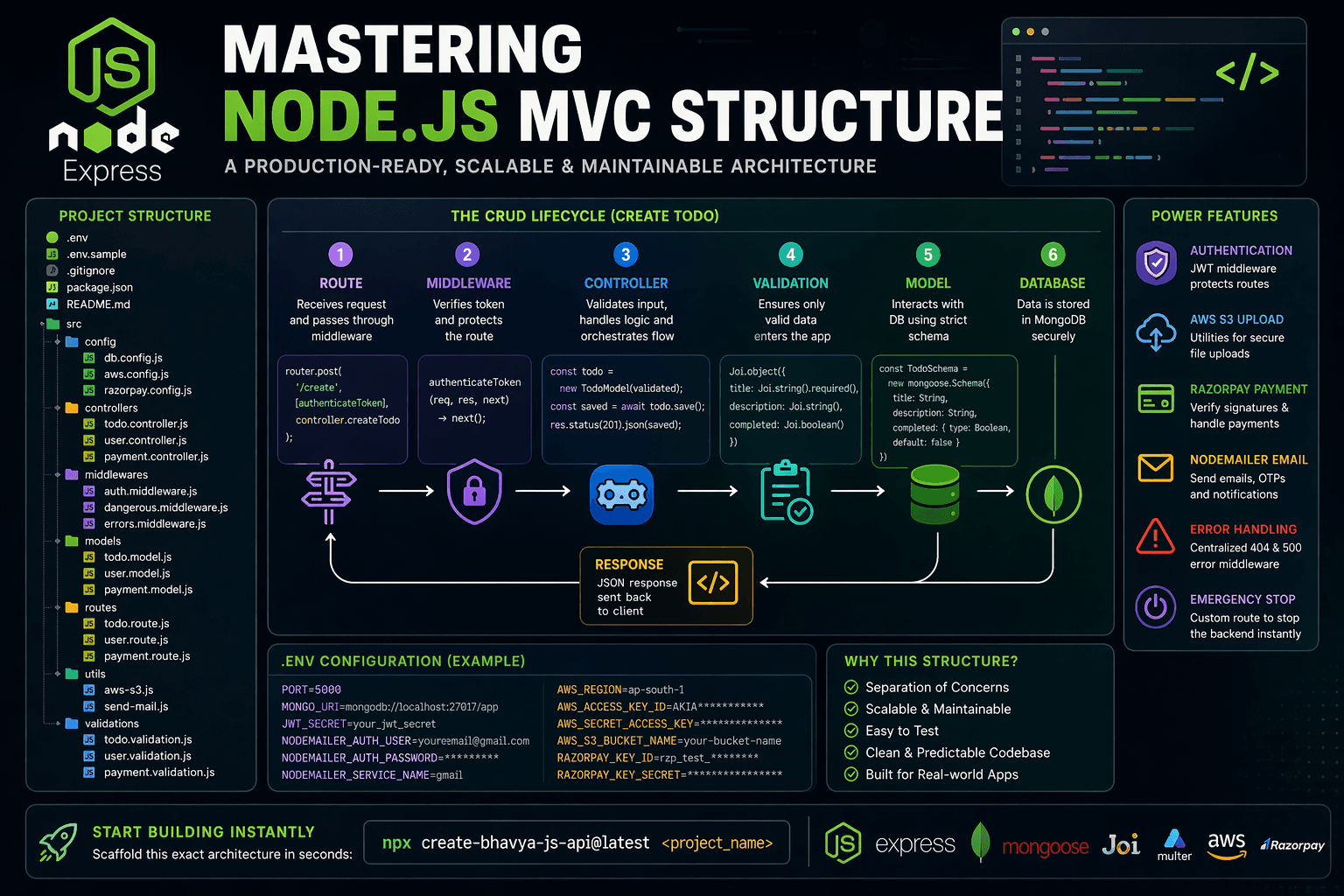
When starting out with Node.js and Express, it's incredibly easy to get overwhelmed. The ecosystem is famously unopinionated—you can string together an entire application's routing, logic, and database connections into a single file. But as your project grows, that flexibility quickly becomes a nightmare to maintain.
The solution is adopting a proven architecture like MVC (Model-View-Controller). Setting up a bulletproof structure from scratch can take hours, but as we'll explore below, the payoff in developer experience is massive. (And if you stick around until the end, I'll show you how to jump straight to building features with a single scaffold command).
The Anatomy of an Express MVC API
In a robust MVC structure, responsibilities are strictly separated into dedicated folders. Here is what a complete, production-ready structure looks like:
plaintext
1|	.env
2|	.env.sample
3|	.gitignore
4|	package-lock.json
5|	package.json
6|	README.md
7|	vercel.json
8|
9\---src
10	|	app.js
11	|
12	+---config
13	|		aws.config.js
14	|		db.config.js
15	|		razorpay.config.js
16	|
17	+---controllers
18	|		payment.controller.js
19	|		todo.controller.js
20	|		user.controller.js
21	|
22	+---middlewares
23	|		auth.middleware.js
24	|		dangerous.middleware.js
25	|		errors.middleware.js
26	|
27	+---models
28	|		payment.model.js
29	|		todo.model.js
30	|		user.model.js
31	|
32	+---routes
33	|		payment.route.js
34	|		todo.route.js
35	|		user.route.js
36	|
37	+---utils
38	|		aws-s3.js
39	|		send-mail.js
40	|
41	\---validations
42			payment.validation.js
43			todo.validation.js
44			user.validation.js
1. Configuration and Security (.env)
plaintext
1PORT=
2MONGO_URI=
3JWT_SECRET=
4NODEMAILER_AUTH_USER=
5NODEMAILER_AUTH_PASSWORD=
6NODEMAILER_SERVICE_NAME=
7AWS_REGION=
8AWS_ACCESS_KEY_ID=
9AWS_SECRET_ACCESS_KEY=
10AWS_S3_BUCKET_NAME=
11RAZORPAY_KEY_ID=
12RAZORPAY_KEY_SECRET=
A good structure keeps secrets out of your repository logic. The `.env` variables dictate exactly what the application needs to run securely:
- PORT: The server port (e.g., 5000).
- MONGO_URI: Your MongoDB database connection string.
- JWT_SECRET: Secure key for signing JSON Web Tokens.
- NODEMAILER_AUTH_USER / NODEMAILER_AUTH_PASSWORD / NODEMAILER_SERVICE_NAME: SMTP credentials for sending emails.
- AWS_REGION / AWS_ACCESS_KEY_ID / AWS_SECRET_ACCESS_KEY / AWS_S3_BUCKET_NAME: AWS credentials for file uploads.
- RAZORPAY_KEY_ID / RAZORPAY_KEY_SECRET: Secure keys for handling payments.
2. Predictable Data Flow (The CRUD Lifecycle)
The absolute best part of MVC is its predictable data lifecycle. Let's trace how a real 'Create Todo' operation moves through the app.
Step 1: The Route
javascript
1// src/routes/todo.route.js
2const express = require("express");
3const router = express.Router();
4const controller = require("../controllers/todo.controller");
5const { authenticateToken } = require("../middlewares/auth.middleware");
6
7router.post("/create", [authenticateToken], controller.createTodo);
The Route acts as the post office. It receives a POST request at `/create`, forcefully passes it through a JWT `authenticateToken` middleware to ensure the user is logged in, and then maps the request to the correct Controller.
Step 2: The Validation
javascript
1// src/validations/todo.validation.js
2const Joi = require("joi");
3
4const todoValidation = Joi.object({
5  title: Joi.string().required(),
6  description: Joi.string().required(),
7  completed: Joi.boolean(),
8});
Before running any heavy logic, the Joi schema strictly enforces what data is allowed. If a user forgets to send a `title`, the request is immediately rejected, keeping malicious data away from your database.
Step 3: The Controller
javascript
1// src/controllers/todo.controller.js
2const createTodo = async (req, res) => {
3  try {
4    // Validate Input
5    const validated = await todoValidation.validateAsync(req.body);
6
7    // Pass off to Model
8    const todo = new TodoModel(validated);
9    const savedTodo = await todo.save();
10
11    // Return JSON
12    res.status(201).json(savedTodo);
13  } catch (err) {
14    res.status(500).json({ message: err.message });
15  }
16};
The Controller is the 'brain'. It catches the request, runs the Joi validation, constructs a new Mongoose Model object, and determines whether to respond with a `201 Created` or a `500 Server Error`.
Step 4: The Model
javascript
1// src/models/todo.model.js
2const mongoose = require("mongoose");
3
4const TodoSchema = new mongoose.Schema({
5  title: String,
6  description: String,
7  completed: { type: Boolean, default: false },
8}, { timestamps: false });
9
10module.exports = mongoose.model("Todo", TodoSchema);
The Model dictates the strict data layer. Regardless of what the Controller throws at it, the Model ensures that MongoDB only stores what fits this strict mongoose layout.
3. Abstracting Complex Features
Beyond basic CRUD, a true MVC architecture shines when handling complex integrations. By relying on custom Middlewares and Utilities, your controllers never get bloated.
Authentication (JWT Middleware)
javascript
1const authenticateToken = (req, res, next) => {
2  const token = req.header("x-auth-token");
3  if (!token) return res.status(401).json({ message: "Missing token" });
4
5  jwt.verify(token, secretKey, (err, user) => {
6    if (err) return res.status(403).json({ message: "Invalid token" });
7    req.user = user;
8    next();
9  });
10};
Instead of checking auth in every controller, this middleware intercepts the routes natively.
Cloud Uploads (AWS S3 Utility)
javascript
1const uploadFileToS3 = (folderName) => {
2  return multer({
3    storage: multerS3({
4      s3: s3,
5      bucket: process.env.AWS_S3_BUCKET_NAME,
6      acl: "public-read",
7      key: (req, file, cb) => cb(null, `${folderName}/${Date.now()}-${file.originalname}`)
8    })
9  });
10};
File handling is isolated in the `utils` folder, plugging directly into AWS using `multer-s3`.
Payments (Razorpay Configuration)
javascript
1const verifyPayment = async (req, res) => {
2  const generated_signature = crypto
3    .createHmac("sha256", process.env.RAZORPAY_KEY_SECRET)
4    .update(`${razorpay_order_id}|${razorpay_payment_id}`)
5    .digest("hex");
6
7  if (generated_signature === razorpay_signature) {
8    // Payment successful logic...
9  }
10};
Monetization endpoints strictly verify incoming signatures dynamically.
Email Delivery (Nodemailer Utility)
javascript
1const sendMail = async (to, subject, html) => {
2  const mailOptions = {
3    from: process.env.NODEMAILER_AUTH_USER,
4    to,
5    subject,
6    html,
7  };
8  return transporter.sendMail(mailOptions);
9};
Need to send OTPs? A single, reusable function handles all SMTP deliveries.
Centralized Error Handling
javascript
1const notFoundMiddleware = (req, res, next) => {
2  res.status(404).json({ message: "Route Not Found!" });
3};
4
5const internalServerErrorMiddleware = (req, res, next) => {
6  res.status(500).json({ message: "Internal Server Error!" });
7};
8
9module.exports = { notFoundMiddleware, internalServerErrorMiddleware };
No more messy error configurations scattered everywhere. This structure uses specialized error-handling middlewares placed at the bottom of the routing stack in `app.js` to catch 404s and 500s globally, ensuring your API always responds with a clean, consistent format.
The Emergency Stop Switch
javascript
1const stopBackendMiddleware = (req, res, next) => {
2  res.json({ message: "Stopping Backend! None of the APIs will work from now!" });
3  process.exit(0);
4};
A great example of custom Express logic—a specific route that halts the entire backend process in case of severe emergencies.
A good structure isn't just about code; it's about the developer experience. This API structure is designed to let you focus on building features, not fighting with setup.
Start Building Instantly
Understanding this flow lets you focus entirely on building your application logic. But if you want to skip the hours of writing folder trees, configuring error handlers, and stringing together middlewares, you can scaffold this exact architecture locally in seconds.
bash
1npx create-bhavya-js-api@latest <project_name>